HBADA X7 Smart Ergonomic Chair Review: Worth It? (November 2026)
The HBADA X7 Smart Ergonomic Chair is worth it for desk-bound buyers who want lumbar support that adjusts itself, plus massage and heat built into the seat. Its motorized lumbar system and comfort extras are the reasons to pay more than a plain mesh chair.
On this page (9 sections)
The HBADA X7 Smart Ergonomic Chair earns its keep if you sit for long stretches and want support that reacts to how you move. Its automated lumbar tracking, massage and graphene heating are the headline features, and they set it apart from fixed-back mesh chairs.
This HBADA X7 smart ergonomic chair review looks at the specs that shape daily use, the setup work involved and who should look at something simpler. The short version: buy it for smart comfort, skip it if you want a plain manual chair at a lower tier.
The HBADA X7 at a glance
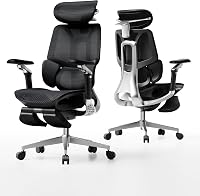
The X7 is a grey mesh chair with a motorized lumbar system that adjusts to your posture as you sit. A 4D headrest, 720° armrests and a synchronized recline round out the fit adjustments.
Hbada X7 Smart Ergonomic Chair: Best for all-day smart support

- Automated lumbar tracking
- 8D biomimetic massage
- Graphene heating
- 720° adjustable armrests
The lumbar support moves with your posture instead of sitting fixed in one spot. Massage, heat and ventilation turn it into a comfort chair for long days at the desk.
Pros
- Lumbar support tracks your posture automatically
- Massage and graphene heating built in
- Three seat airflow levels
- 720° armrests and a 4D headrest
Cons
- Premium tier price
- More electronics to look after than a manual chair
The smart part is the automated lumbar support. Hbada uses dual pressure sensors and a high-speed control system to move the lumbar pad when you lean forward, sit upright or recline.
The seat also carries 8D biomimetic massage, graphene heating and red light comfort technology.
That combination puts the X7 in a different class from a fixed-back office chair. You're buying electronics and a comfort system, not just mesh and a gas lift.
The frame is aerospace-grade aluminum, and the seat and back use high-elastic breathable mesh over a ventilated comfort seat. Hbada calls it a contemporary design in pure grey, and the whole package is aimed at people who treat their desk as a full-day workplace.
Who should buy the HBADA X7?
Buy the X7 if your working day runs 8 to 12 hours at a desk and your lower back complains by mid-afternoon. Hbada builds it for professionals who sit long shifts, and the moving lumbar support is the feature that justifies the extra spend.
It also suits people who work cold. Graphene heating and massage make the seat a warmer, more restful place between meetings or gaming sessions.
The 8D biomimetic massage and gentle red light comfort technology are there for recovery, not therapy, so think of them as a way to reset between tasks.
Skip it if you mostly sit for an hour or two and want the simplest chair that works. A manual lumbar chair does the basic job without electronics to maintain.
The chair also fits a specific desk culture. If you take calls, lean in to type and recline between tasks, the tracking lumbar has something to respond to.
If you sit bolt upright in one spot all day, a fixed pad you set once may feel steadier.
The specs that matter in daily use
The lumbar tracking is the spec you'll notice most, because it changes position as your posture does. Sensors feed the control system, which moves the lumbar pad to follow your lower back.
The seat airflow matters too. Three ventilation levels move air through the seat during long sessions, which helps on warm days or in a stuffy room.
Hbada pairs that with high-elastic breathable mesh across the back.
Fit adjustments cover most bodies. The headrest moves in four directions, the armrests rotate through 720°, the seat depth slides, and the back reclines through several angles on a synchronized mechanism.
Here are the key specs in one view.
| Detail | HBADA X7 |
|---|---|
| Frame | Aerospace-grade aluminum |
| Back and seat material | Breathable mesh |
| Armrests | 720° adjustable (height, depth, width, pivot) |
| Headrest | 4D adjustable |
| Lumbar support | Automated tracking with dual pressure sensors |
| Comfort features | 8D massage, graphene heating, red light |
| Seat ventilation | Three levels |
| Recline | Synchronized, multiple angles |
| Footprint | 27.5 x 27.5 x 40 in |
The aluminum frame is the part that carries the load. Hbada says every component is engineered for professional everyday use, so the build is aimed at heavy daily sitting rather than occasional use.
The armrest adjustment is unusually broad for a mesh chair. Height, depth, width and pivot movement mean you can bring the pads to your elbows instead of hunching your shoulders to meet them.
That matters over a long day, because shoulder tension builds when the arms sit too high or too far forward.
How to set up the HBADA X7
Set aside about an hour and build it on a clear floor before you move it to your desk. The chair arrives as parts, and the electronics mean a little more care than a basic task chair.
Start with the base and casters, then fit the gas lift and seat. The back and armrests go on next, and the headrest last so you can set its height once you're seated.
The lumbar housing and massage wiring need a tidy route so nothing catches the wheels. Hbada's smart system runs on power, so plan where the cord will go and keep it clear of foot traffic.
Once built, sit and adjust the seat height, depth and headrest before you switch on the lumbar tracking. Let the system follow your normal posture rather than forcing yourself into a fixed position.
A few minutes spent on the armrests pay off, since the 720° range lets you set height, depth, width and pivot in one go. Set the seat depth so your back meets the lumbar pad without a gap, then let the tracking take over from there.
Using the smart lumbar support day to day
The lumbar pad moves as you change posture, so you don't need to reset it every time you lean forward or back. That's the feature to judge the chair on, because it's what you paid for.
Lean forward to type and the support follows your lower back. Sit upright for a call and it settles behind you.
Recline and it keeps contact instead of leaving a gap. The dual pressure sensors and high-speed control system do the adjusting, so the pad tracks your posture rather than waiting for you to move a lever.
Treat the massage and heat as comfort extras rather than therapy. The 8D biomimetic massage and graphene heating help you relax between tasks, and the heating makes cold mornings easier.
The red light comfort technology is part of the same recovery package. Use them in short bursts and give the electronics a rest.
The seat ventilation is worth switching on during long sessions. Three levels let you dial in airflow without a fan on your desk.
Between the airflow and the mesh back, the chair stays cooler than a padded seat during a long afternoon.
Care and maintenance for a smart chair
Wipe the mesh and seat regularly and keep the electronics dry. A soft damp cloth handles dust, and a dry cloth finishes the job.
Vacuum the seat and back mesh with a brush attachment to clear crumbs and pet hair. Avoid soaking the fabric, since water near the lumbar housing and massage unit can cause problems.
Check the armrest fittings and casters every few months. Tighten anything that works loose, and clear hair from the wheels so the chair still rolls smoothly.
The 720° armrests have more joints than a basic pad, so they deserve a quick look during the same pass.
Keep the heating and massage controls clean and free of spills. If the smart system ever stops responding, check the power connection before assuming a fault.
Store the chair away from direct sun and damp rooms. Mesh and electronics last longer in a dry, temperate spot.
The aluminum frame needs little beyond a wipe, but the mesh and the smart housing are the parts that age first, so keep them clean and dry.
The trade-offs to know before you buy
The main trade-off is tier and electronics. The X7 sits at a premium tier, and the smart lumbar system, massage and heating mean more to look after than a manual chair.
The footprint is another real point. At 27.5 inches square, it needs a clear patch of floor and enough room to recline.
Measure your desk opening and walking space before you order. The base housing for the smart lumbar adds bulk low down, so the chair takes more room than a slim task chair.
The lumbar support moves on its own. Some people love that, but others prefer a fixed pad they set once.
If you like to feel a stable, unchanging back, this chair may feel busy. The tracking responds to how you sit, so it is always doing something.
The heating and massage also make the seat warmer than a plain mesh chair. In a hot room without air conditioning, you may end up using the ventilation more than the heat.
Plan the power cord as well. The smart system needs an outlet near the desk, and a trailing cable across the floor is the one thing that can spoil an otherwise tidy setup.
Alternatives worth a look
Two other chairs here cover different needs, and both are worth comparing before you commit. If you want a manual ergonomic chair at a lower tier, the GABRYLLY office chair review covers the closest rival.
GABRYLLY High Back Ergonomic Chair
The GABRYLLY is the manual option for buyers who don't want electronics. It offers four support points at the head, back, hips and hands, with a proper lumbar pad you set yourself.
The 3D headrest and 2D armrests adjust by hand, so nothing needs power or maintenance.
Its high back and wide cushion suit bigger bodies, and the seat measures 20.5 inches wide by 20 inches deep. GABRYLLY sizes it for users between 5'2" and 6'1", with a 300 lb load capacity.
The whole chair runs 24.5 inches wide by 27.5 inches deep, close to the X7's footprint but without the smart housing.
The flip-up armrests fold 45° so you can push the chair under the desk. The back tilts from 90 to 120° with a three-stage lock.
GABRYLLY backs it with a 3-year warranty and builds the chair on a BIFMA-certified frame with a class-4 gas lift and PU mute wheels. If you want the ergonomic basics without wiring or controls, this is the simpler route.
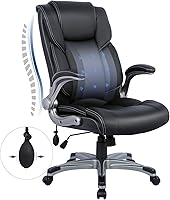
XISHE Mesh Back Leather Desk Chair
The XISHE is the budget-friendly leather option for buyers who prefer a padded seat over mesh. A thickened sponge cushion covered in PU leather gives it a softer feel.
The PU surface is also easier to wipe clean than mesh.
The mesh back keeps air moving, and the S-shaped back curve supports the spine. Lumbar support adjusts up and down, and seat height runs from 17.72 to 22.44 inches.
That height range covers a wide span of desk setups, though the lumbar pad is manual and stays where you put it.
The 90° flip-up armrests save space under a desk, and the chair carries a 300 lb capacity with SGS certification and BIFMA testing. Quiet casters and a 360° swivel keep it easy to move.
The 3-stage cylinder adds stability to the base. It's a mid-back chair at 38.4 inches tall overall, so it sits lower than the X7's 40 inches and leaves more clearance under a low desk.
Verdict: who should buy the HBADA X7?
Buy the HBADA X7 if you sit for long days and want lumbar support that moves with you. The automated tracking is the reason to choose it over a manual chair, and the massage, heat and seat ventilation make long sessions more comfortable.
The 720° armrests and 4D headrest add fit that most mesh chairs in this group don't offer.
Skip it if you want a simple chair at a lower tier. The GABRYLLY is the better manual pick for most people who don't need electronics, and the XISHE suits buyers who want a padded leather seat.
Before you order, measure your floor space and your desk opening. The X7 rewards buyers who plan the footprint and the power cord, and it gives back smart support every working day.
For the wider choice between chair types, our guide to ergonomic chair vs regular chair explains what changes in daily use. If you're weighing a padded executive style against a task chair, the executive chair vs office chair comparison covers the differences.
Frequently asked questions
Does the HBADA X7 need a power supply for its lumbar support?
The automated lumbar tracking, massage and heating all run on power, so the chair needs a reachable outlet near your desk. Plan the cord route before you assemble it so the wiring stays clear of wheels and foot traffic.
Can the lumbar support be turned off?
The lumbar mechanism adjusts as you move, while the massage and heating are separate comfort features you control. If constant movement in the lower back isn't for you, a manual lumbar chair like the GABRYLLY may suit you better.
How much assembly does the HBADA X7 need?
It arrives as a kit with the frame, seat, back, headrest and armrests, and you build it with the included tools. Set aside a calm hour and read the steps first, since the electronics and armrest fittings take more care than a basic task chair.
Is the HBADA X7 a good fit for a small home office?
It measures 27.5 inches deep and 27.5 inches wide, so give it a clear footprint before you order. The 720° armrests help, but the smart lumbar housing adds bulk at the base, so measure your desk opening and walking space.