HBADA E3 Pro Ergonomic Office Chair Review: Worth It? (November 2026)
The HBADA E3 Pro fits most desk workers between 5'1" and 6'5" and earns our highest score here for its floating three-zone lumbar support and 140-degree recline. Choose it if you want deep adjustability; pick a flip-up-arm chair if you need to tuck it under a desk.
On this page (10 sections)
- The HBADA E3 Pro at a glance
- Who should buy the HBADA E3 Pro
- The specs that matter in daily use
- Setting up the E3 Pro
- Living with the E3 Pro day to day
- Care and long-term use
- The trade-offs to weigh
- The alternatives worth comparing
- How the E3 Pro compares to the other two
- Verdict: is the HBADA E3 Pro worth it?
The HBADA E3 Pro is a strong buy for anyone who sits at a desk for hours and wants support that moves with them. It scores 9.7 here, the highest in this group, because the lumbar wings, 4D headrest and 720-degree armrests cover more body positions than most chairs at this level.
That said, this hbada e3 pro ergonomic office chair review is honest about the trade-offs. It takes up a wide 27.5 inch footprint and gives you more controls than a simple task chair.
If you want a chair that tucks neatly under the desk instead, the ELABEST below does that better.
The HBADA E3 Pro at a glance
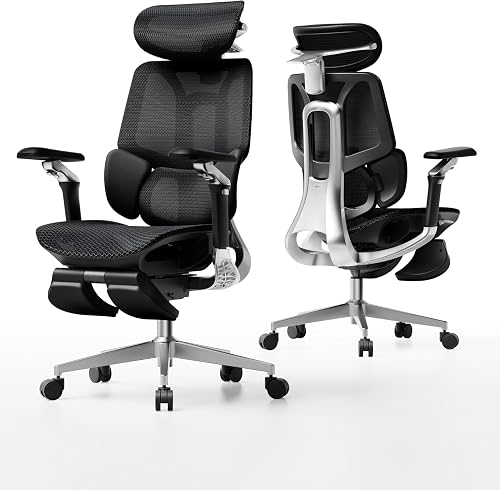
The E3 Pro is a mesh chair built around adjustability. Hbada gives you three separate zones of lumbar support, a headrest that moves in three directions, and armrests that rotate a full 720 degrees.
Hbada E3 Pro 2026 Edition Ergonomic Office: Best for deep lumbar support
- Three-zone floating lumbar support
- Upgraded 4D headrest
- 720-degree armrests
- Recline to 140 degrees
- Fits 5'1" to 6'5"
A heavily adjustable mesh chair for long desk days. The pivoting lumbar wings and wide fit range make it the pick for most people here.
Pros
- Lumbar wings pivot from 40 to 80 degrees
- Headrest adjusts in depth, height and rotation
- Armrests rotate a full 720 degrees
- Warranty covers the base, gas lift and casters for 5 years
Cons
- Wide 27.5 inch footprint
- More controls than a simple task chair needs
The standout is the lumbar design. Two side wings pivot between 40 and 80 degrees to wrap around your back, and the whole unit slides 60mm vertically to line up with your lower spine.
What makes the E3 Pro different
Most chairs offer one lumbar pad fixed to the backrest. The E3 Pro uses a floating three-zone system that responds to gravity rather than a motor, so it shifts as you lean forward or sit back.
Hbada aims that support at the L1-L5 vertebrae, a stretch of the lower back that most desk workers feel first. The wings close in when you lean forward and open when you recline.
Because the lumbar unit is separate from the backrest frame, it can move without dragging the whole back panel with it. That means the support stays in contact with your lower back even as your shoulder position changes.
Who should buy the HBADA E3 Pro
Buy it if you sit for long stretches and want the support to follow your posture. The chair rewards users who adjust settings and move through the day, from focused typing to a leaned-back call.
The fit range makes it a good match for hard-to-fit bodies. Hbada lists support for 5'1" to 6'5" (155 to 195cm), with separate adjustments for backrest height, lumbar height and seat depth.
Skip it if your desk sits in a tight corner or you share a small home office. The wide base and deep recline both need clearance.
A slimmer chair that stays put suits a cramped room better.
It also isn't the choice if you want one setting and no fiddling. The E3 Pro expects you to tune it, and the reward is comfort you can feel across the workday.
A short user and a tall user will set the same chair very differently, and both should end up with the lumbar wings sitting in roughly the same spot relative to their spine.
The specs that matter in daily use
The 140 degree recline and 4D headrest do the most work every day. Hbada spaces the recline across four positions: 105 degrees for focus, 115 for working, 130 for relaxing and 140 for resting.
The headrest moves 70mm in depth, 40mm in height and rotates 70 degrees. That gives you neck support whether you sit upright or lean back, and it adjusts in small steps rather than jumping between positions.
Hbada calls it a dual-axis design, which is why depth and height move independently instead of on a single track.
Armrests get the 720-degree mechanical treatment: dual 360-degree rotation plus 39-degree folding. They float with your elbows instead of leaving your arms hanging.
The 39-degree fold is a hinge movement, separate from the 360-degree swivel that lets each arm pad turn under your forearm.
Hbada also redesigned the mesh. CloudMesh is high-elasticity, so it flexes under you and keeps air moving.
The seat pad uses synthetic foam over a polypropylene frame, and the whole chair stands on a straight-leg base with casters. The seat depth slides 50mm and the backrest itself adjusts 80mm on its own track.
| Detail | HBADA E3 Pro 2026 Edition |
|---|---|
| Lumbar support | Three-zone, 60mm vertical |
| Lumbar wing pivot | 40 to 80 degrees |
| Headrest | 4D dual-axis, 70mm depth, 40mm height |
| Recline | 105 to 140 degrees, four positions |
| Armrests | 720-degree mechanical |
| Fit range | 5'1" to 6'5" (155 to 195cm) |
| Seat depth adjustment | 50mm |
| Gas cylinder | SGS-certified Class 4 |
| Dimensions | 27.5 x 27.5 x 40 in |
Setting up the E3 Pro
Assembly follows a simple sequence with the included tool. Hbada lists the steps as fitting the legs with screws, sliding the backrest into the seat frame, bolting the armrests to the sides and pushing the casters into the base.
The instructions name the order for a reason. Attaching the legs first gives you a stable base to work from, so the seat frame doesn't wobble while you lift the backrest into place.
The armrest bolts go on last, once the backrest is seated and square.
Set the chair height so your feet rest flat on the floor, then set the seat depth so a fist fits behind your knee. Adjust the lumbar height last, raising or lowering it until the wings sit against your lower back rather than your ribs.
Do the tuning in stages over your first few days. That way you'll notice whether the lumbar support sits too high when you lean forward.
Once you've found a setting that works, note where the marks sit. It makes recovery easier if someone else uses the chair or you move it between rooms.
The Class 4 cylinder holds height firmly, so there's no slow drift to correct between sessions.
Living with the E3 Pro day to day
The gravity-sensing tilt tension is what separates the E3 Pro from cheaper mesh chairs. It adjusts to your body weight as you recline, so the chair doesn't push back too hard for lighter users or feel loose for heavier ones.
That weight sensing matters most in shared rooms. Two people of different builds can sit in the same chair and each get a recline that feels balanced, without hunting for a tension dial.
Move through the four recline stops rather than jamming the lever. The 140-degree setting works best for a short break, not for typing.
Keep focus work at 105 or 115 degrees. The 130-degree stop is a good middle ground for reading or a long call.
The CloudMesh back stays cool and flexes with your shoulders. It moves with you, unlike a rigid plastic shell.
The high-elasticity mesh also spreads contact across a wider area, so there's less pressure in any one spot during a long session.
The wide footprint means you'll want clearance behind the chair for the recline. Leave a gap between the chair and any wall or cabinet, then check the armrests clear your desk edge before you lower the height.
The 39-degree fold helps here, letting each arm pad hinge up slightly when the chair slides close to the desk.
Care and long-term use
Clean the mesh back and seat with a soft, damp cloth and mild soap. Avoid harsh cleaners, because they can break down the mesh fibers over time.
Vacuum the seat pad and armrest pads now and then to pull dust and crumbs from the texture. Wipe spills right away so foam under the mesh stays dry.
Check the bolts at the base and armrests a few times a year. Tighter screws keep the chair stable and stop the frame from rocking.
The armrests carry the most moving parts, so give the folding hinge a quick look as well and clear any grit that works its way in.
The heavy-duty parts get Hbada's 5-year warranty: the base, gas lift and casters. That's a real step up from 3 years, and it covers the pieces most likely to wear with daily use.
Store the paperwork somewhere you can find it, since a warranty that long is easy to forget.
The trade-offs to weigh
The main cost of all this adjustability is space and complexity. At 27.5 inches deep and wide, the chair suits a room with a dedicated desk zone, not a shared bedroom corner.
More controls mean more to learn. Some people will appreciate that, but if you want a chair you sit in without thinking, a simpler model is smarter.
The floating lumbar is the clearest example: it does its best work when you set the height right and let it move, not when you leave it wherever it shipped.
The armrests fold only 39 degrees. That's enough for arm support but not enough to tuck the chair fully under a shallow desk.
If desk stowage matters most, the ELABEST below does it better.
None of these is a deal-breaker for the right buyer. Weigh them against how much time you spend seated and how much you move across the day.
Someone who leaves the chair in one position all day gets less from the three-zone lumbar than someone who leans and reclines often.
If you want to see how a simpler ergonomic chair handles this same ground, our GABRYLLY office chair review covers a lower-scoring but easier option.
The alternatives worth comparing
The E3 Pro doesn't sit alone here. Two other chairs solve narrower problems well, so compare them before you commit.
ELABEST X100 Chair with Footrest
The ELABEST X100 is the pick if you want a chair that disappears under the desk. Its 5D flip-up arms fold away, and an 18 inch footrest extends for a stretched-out break.
The X100 holds up to 300 lb and comes with a BIFMA-certified frame, an integrated step-on footrest base and a Grade-4 gas column. Its 3D lumbar support locks into depth as well as height, so you can pin it against a specific spot.
The footrest and the wider frame make the X100 heavier than the E3 Pro. That's fine in a fixed home office, but it's more chair to move around.
HOLLUDLE V Back Mesh Chair
The HOLLUDLE is the budget pick for readers who want most of the ergonomic features without the E3 Pro's extra hardware. It carries 3D lumbar support, 3D armrests and a 2D headrest.
The V-shaped silver back adds visual interest, and BIFMA and EN1335 compliance back its build. Holludle includes a three-level tilt lock and a 5-year warranty.
Its base is rated to 1136kg of strength and the mechanism uses a 35mm steel plate, so the budget tier still carries real structure.
What it doesn't have is the 720-degree armrests or the deep 140-degree recline. Those are the E3 Pro's signature features, and they're why it costs more.
For broader guidance on how these styles divide up, our executive chair vs office chair piece explains which shape suits which desk.
How the E3 Pro compares to the other two
The E3 Pro wins on adjustability, the ELABEST wins on footprint, and the HOLLUDLE wins on value. Each one suits a different room and a different body.
| Product | Best for | Lumbar adjustment | Recline | Warranty | Our score |
|---|---|---|---|---|---|
| Hbada E3 Pro 2026 Edition Ergonomic Office | deep lumbar support | 60mm vertical | 105 to 140 degrees | 5 years on the core frame | 9.7 |
| ELABEST X100 Chair with Footrest | napping between tasks | 8.6 | |||
| HOLLUDLE V Back Mesh Chair | the smaller budget | 7.8 |
If you want the deepest lumbar support and don't mind a wide chair, the E3 Pro is the strongest choice. If floor space is tight and you still want a footrest, the X100 is better.
And if you'd rather spend less and keep the basics, the FelixKing mesh chair review is worth a read, as is our look at CAPOT ergonomic mesh office chair reviews for a third angle.
Verdict: is the HBADA E3 Pro worth it?
Yes. In this hbada e3 pro ergonomic office chair review, the chair earns its 9.7 score for one reason: it supports your back in more positions than anything else here.
The 9.7 reflects the three-zone lumbar design, the four-stop 140-degree recline and a fit range that covers most adults.
Pick the E3 Pro if you sit for long stretches, like support that follows your posture and have the floor space for a 27.5 inch base. Set it up properly and the 5-year warranty on the core frame covers the base, gas lift and casters.
Pick the ELABEST X100 instead if you want a footrest or need to tuck the chair under the desk. Pick the HOLLUDLE if you want the core ergonomic features for less.
Whichever you choose, sit in it for a week before you judge it, because these chairs reward small adjustments.
Frequently asked questions
Is the HBADA E3 Pro good for tall users?
Yes. Hbada says the chair fits users from 5'1" to 6'5".
The backrest moves 80mm, the lumbar 60mm and the seat depth 50mm, so tall or short users can line up the support with their own back.
Does the E3 Pro recline far enough to sleep in?
It reclines to 140 degrees, which is deep enough to lean back and rest but not a full lie-flat. The tilt tension adjusts to your body weight through a gravity-sensing mechanism, so the recline moves smoothly through its four positions.
How much space does the HBADA E3 Pro take up?
The chair measures 27.5 inches deep, 27.5 inches wide and 40 inches tall. That wide base gives stability, but leave room for the recline and check your desk height before you buy.
What does the HBADA warranty cover?
Hbada backs the base, gas lift and casters with a 5-year warranty, up from 3 years on earlier models. The gas cylinder is SGS-certified Class 4 and the chair is BIFMA compliant.