Should an Office Chair Have Armrests?
Yes, most people should choose an office chair with armrests. Arms carry part of your arm weight and set your shoulders at a relaxed height, so adjustable arms are the safer default for long desk days.
On this page (7 sections)
- Why do armrests matter for long desk sessions?
- Should an office chair have armrests for every type of work?
- How high should office chair armrests be?
- What do adjustable arms let you change?
- When is an armless chair the better choice?
- How do you set up arms without ruining your desk height?
- Which chair should you pick?
Yes, most people should choose an office chair with armrests. Arms carry part of your arm weight and hold your shoulders at a relaxed height, which takes load off your neck and upper back during long desk sessions.
That answer comes with a condition. The arms only help when you can set their height to match your desk, so fixed arms often do more harm than no arms at all.
The rest of this guide covers when arms help, when they get in the way, and how to set them.
Why do armrests matter for long desk sessions?
Armrests reduce the work your shoulders do all day. Without them, your forearms hang from your shoulders or rest hard on the desk edge, and the muscles around your neck stay switched on to hold the position.
The effect is small per minute and large over a workday. Arms give your forearms a place to land, so your hands can rest lighter on the keyboard between keystrokes.
That matters most for people who type or mouse for six or more hours.
Arms also steady your torso. When your elbows rest at your sides, you're less likely to lean toward the mouse or twist toward a second screen.
The chair does some of the balancing for you.
The catch is fit. An armrest set too high lifts your shoulders toward your ears.
One set too low makes you lean down and forward. Neither is better than a plain seat, so height adjustment is the feature that decides whether arms help.
Should an office chair have armrests for every type of work?
No. Arms help desk work and get in the way for some tasks.
Match the arms to how you actually sit, not to what looks comfortable in a showroom.
Typing, reading, video calls and drawing all benefit from forearm support. So does anyone who leans on the desk edge out of habit.
Adjustable arms let you keep your elbows near your body while the keyboard stays at the right height.
Tasks that need free shoulder movement are different. Playing an instrument, using a graphics tablet at an angle, or reaching across a wide desk all work better when the arms fold away or come off.
Chairs with flip-up arms cover both cases.
Shared desks are another case. If several people use one chair, arms need a wide height range and a way to get out of the way.
A chair with adjustable arms handles that better than fixed arms.
How high should office chair armrests be?
Set the top of each arm just under your relaxed elbow, so your forearm rests level and your shoulder stays down. Your elbow should bend to roughly a right angle when your hands are on the keyboard.
Start with your seat height. Our guide to how high should your office chair be explains how to set the seat first, because arm height follows the seat and desk, not the other way round.
Then check two things. Your shoulders should sit level and relaxed, not lifted.
And the arms should be close enough that your elbows stay near your ribs while you type.
If your desk is too high for the chair, arms can't fix it. A keyboard tray or a footrest changes the relationship between your body and the desk, and arms then sit where they should.
What do adjustable arms let you change?
Adjustable arms change height first, then width and depth. Each axis solves a different fit problem, and the more of them a chair offers, the easier the setup.
Height is the must-have. It decides whether your shoulders relax or lift.
Width and depth matter for broader or narrower shoulders and for how close you sit to the desk.
Some arms turn inward or outward at the elbow. That helps when you switch between typing and reading, or between an upright desk posture and a reclined one.
Flip-up arms swing out of the way for instrument playing or quick desk access.
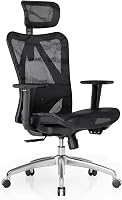
The SIHOO M57 uses 3D armrests, so you can move them in more than one direction rather than leaving them fixed. That's the kind of arm that lets a single chair suit two people at one desk.
When is an armless chair the better choice?
An armless chair wins when space is tight or you need free shoulders. Small rooms, sloped ceilings and desks tucked into alcoves often leave no room for arms to swing.
Armless chairs also slide fully under a desk. That keeps a small home office looking clear when you finish work, and it protects the arms from catching on drawers.
If you move between sitting and standing, arms can block the motion.
They suit casual use too. A chair used for reading, makeup or a guest corner doesn't need forearm support the way a full workday does.
Fewer parts also mean less to adjust and less to break.
The trade-off is real. An armless chair gives your shoulders nothing to rest on, so long typing sessions ask more of your neck and upper back.
If you sit for hours, arms are worth the floor space.
How do you set up arms without ruining your desk height?
Treat the arms as the last adjustment, not the first. Set the seat height for your feet, then the desk or keyboard for your hands, then bring the arms up to meet your elbows.
If the arms stop the chair from sliding under the desk, raise the desk or lower the arms. Don't lower the seat to make the arms fit, because that pushes your knees up and your feet off the floor.
Keep the arms level with each other. A tilted arm pushes one shoulder higher and slowly pulls your spine sideways.
Check the height on both sides after any change.
Clear the space under the desk before you adjust. Cables, a drawer unit or a bag can stop the chair rolling close enough for the arms to be useful.
Who should choose the ELABEST X100?
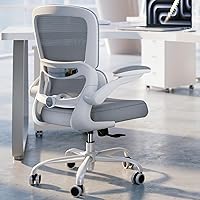
Choose the ELABEST X100 if you want arms that fold away and a footrest for breaks. Its 5D flip-up arms adjust in height, width, forward and back position and rotation, then tuck under a standard desk.
The extendable 18-inch footrest has two angle positions, so you can lean back between tasks without leaving the chair. A 3-stage recline covers the same switch from upright work to a relaxed posture.
The arms are the reason it fits here. Flip-up arms give you forearm support while you type, then swing clear when you play an instrument, reach across the desk or slide the chair away.
That covers both sides of the armrest question in one chair.
Who should choose the Sweetcrispy Small Armless Desk Chair?
Choose the Sweetcrispy chair if space is the deciding factor. It's armless by design, with a Y-shaped mesh back and a seat height that adjusts from 15.94 to 20.67 inches.
The small footprint and armless frame let it tuck under a desk in a bedroom or study. The removable seat cushion makes cleaning simple, and the mesh back keeps air moving on warm days.
Skip it if you sit for long stretches. With no arms, your shoulders carry more of the load, so this chair suits short study sessions and tight rooms rather than full workdays.
Pair it with a desk that sits at the right height and take breaks.
Which chair should you pick?
For most people, an office chair should have armrests, and they should adjust. Pick arms you can set to your elbow height, then use them as the last step in your desk setup.
Choose the SIHOO M57 if you want the safest all-round answer for long desk days. Its 3D arms, tilting headrest and shifting lumbar support cover the fit details that make arms useful.
For more head and neck support, compare the best office chairs with a headrest.
Choose the ELABEST X100 if you want arms that get out of the way and a footrest for breaks. If arm height is your main concern, our roundup of office chairs with adjustable arms covers the options in more detail.
Choose the Sweetcrispy chair if a small room leaves no space for arms. For background on the arms-versus-no-arms debate, read should an office chair have arms.
Whichever you pick, set the seat height first and the arms last. Arms that fit your elbows make a desk day easier; arms that fight your desk make it worse.
Frequently asked questions
Are armrests bad for posture?
Not if you set them right. Arms that sit too high push your shoulders up, and arms that sit too low let you slump toward one side.
Set the top of each arm just under your relaxed elbow so your shoulders stay down and level.
Can I remove armrests from an office chair?
Only if the maker allows it. On chairs with flip-up or removable arms, folding them away is part of the design.
On fixed arms, unscrewing the brackets can leave exposed holes and may void the warranty, so check the chair's instructions first.
Do armrests help with wrist pain?
They can reduce strain by supporting your forearms so your hands rest lighter on the keyboard. That only works when the arms sit level with your desk and close enough that your elbows stay near your body, so adjustable arms matter more than having arms at all.
What about gaming chairs with armrests?
The same rules apply. Look for arms you can raise, lower, and turn inward, since a reclined gaming posture changes where your elbows want to land.
Flip-up arms also let you pull the chair closer to the desk when you sit upright.