8 Best Office Chairs With Adjustable Arms (October 2026)
The best office chairs with adjustable arms include the SIHOO M57 Mesh Office Chair for 3D arm adjustment, the SIHOO B300 Pro Ergonomic Chair for the most arm positions, and the COLAMY High Back Mesh Chair for 4D arms and a sliding seat.
On this page (7 sections)
- How we chose office chairs with adjustable arms
- Compare adjustable arm movements
- Best office chairs with adjustable arms for different setups
- Which arm adjustment should you choose?
- How do you fit chair arms to a desk?
- What should you check before you buy?
- Which adjustable-arm office chair should you pick?
The best office chair with adjustable arms for the most arm positions is the SIHOO B300 Pro, with 6D armrests that lift, rotate, slide and flip up. The SIHOO M57 offers 3D arms, while the COLAMY combines 4D arms with a sliding seat.
Adjustability labels don't tell the whole story. Check which directions the arms move, whether they flip up, and how the chair's other adjustments fit your desk and body.
If you also want a headrest, compare these picks with our guide to office chairs with a headrest. For a broader shortlist, see our best home office chairs for long workdays.
Our picks at a glance
-
1
-
2

-
3

How we chose office chairs with adjustable arms
The best office chairs with adjustable arms let you match arm position to your desk and sitting habits. We compared the stated arm movements first, then considered useful related adjustments such as seat depth, tilt and lumbar support.
A “3D” or “4D” label can mean different movement combinations from chair to chair. We describe the directions specified for each pick rather than treating the number as a complete explanation.
Our score weighs specs, features and buyer feedback against what you're shopping for. These scores reflect how each chair's stated features fit the needs of someone looking for adjustable arm support.
Compare adjustable arm movements
The SIHOO B300 Pro offers the most specified directions here, while the M57, ELABEST, MOLENTS and GABRYLLY describe 3D arm adjustment. Compare the arm movements and chair dimensions that matter for your setup.
| Product | Best for | Arm adjustment | Recline | Back | Our score |
|---|---|---|---|---|---|
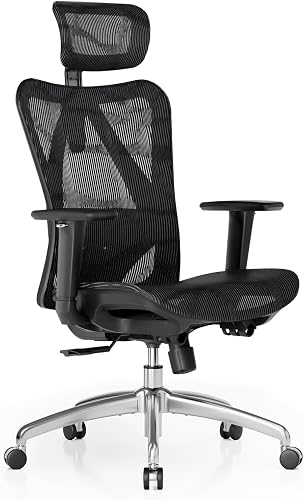
| SIHOO M57 Mesh Office Chair | 3D arm adjustment | 3D | 90° to 126° | High back | 8.6 |
| SIHOO B300 Pro Ergonomic Chair | the most arm positions | 6D flip-up | Up to 135° | 8.6 | |
| COLAMY High Back Mesh Chair | 4D arms and a sliding seat | 4D | High back | 8.2 | |
| ELABEST BIFMA Mesh Chair | 3D arms and a wide seat | 3D | 8.0 | ||
| CAPOT 400 lb Mesh Chair | flip-up arms and a higher capacity | 4D flip-up | 7.9 | ||
| MOLENTS BIFMA Mesh Chair | 3D arms with a mesh seat | 3D | 90° to 120° | 7.7 | |
| Ergoa Mesh Chair with 4D Arms | padded 4D armrests | 4D | 90° to 135° | 7.6 | |
| GABRYLLY BIFMA Mesh Task Chair | wide arm rotation | 3D | 7.5 |
Best office chairs with adjustable arms for different setups
Choose by the movement you need. The SIHOO B300 Pro has the widest stated range, while other chairs pair adjustable arms with a sliding seat, mesh seat or flip-up design.
SIHOO B300 Pro Ergonomic Chair: Best for the most arm positions
- 6D armrests
- Lift, rotate, slide and flip up
- Adjustable seat depth
The 6D armrests offer a wide range of movement, while seat-depth adjustment adds another way to fit the chair to your body.
Pros
- Armrests lift, rotate, slide and flip up
- Adjustable seat depth
- Height-adjustable backrest
Cons
- Arm pad dimensions are not specified
The SIHOO B300 Pro is the strongest fit if you want to move the armrests in several ways. Its 6D arms rotate, slide, lift and flip up, which gives you more options than an armrest described only by a 3D or 4D label.
The chair also has a height-adjustable backrest and adjustable seat depth from 16.53 to 18.5 in. Those adjustments can help you fit the chair to your back and leg length as well as your arms.
Its recline reaches 135 degrees, and a weight-sensing mechanism adjusts recline resistance without a manual tension adjustment. SIHOO includes an oversized 3D headrest.
Pick it when the arm movement is your first priority and you want seat-depth adjustment too. Check that the chair's overall fit and dimensions suit your desk space before choosing it.
SIHOO M57 Mesh Office Chair: Best for 3D arm adjustment
- 3D armrests
- Height, depth and angle adjustment
- Reclines from 90° to 126°
A 3D arm setup suits people who want to adjust arm position along with the chair's headrest and lumbar support.
Pros
- 3D armrests
- Adjustable headrest and lumbar support
- Recline range stated
Cons
- Armrest pad dimensions are not specified
The SIHOO M57 is a simpler choice if 3D armrests meet your needs. Its high back, adjustable headrest and lumbar support offer other ways to tailor the chair.
SIHOO describes the lumbar support as adjustable in height and depth. The chair reclines from 90° to 126°, so it can shift between upright work and a more relaxed sitting position.
The available information identifies the armrests as 3D but doesn't give their exact dimensions or all movement directions. If you need a specific range, such as lateral width adjustment, confirm that detail before buying.
Pick the M57 for a high-back chair with 3D arms and separate headrest and lumbar adjustments. If you need arms that flip out of the way, compare it with the CAPOT or B300 Pro.
COLAMY High Back Mesh Chair: Best for 4D arms and a sliding seat
- 4D armrests
- Sliding seat
- Four-position tilt lock
This chair combines 4D armrests with a sliding seat, headrest adjustment and a four-position tilt lock.
Pros
- 4D armrests
- Sliding seat
- Four-position tilt lock
Cons
- Maximum weight capacity is 300 lb
The COLAMY pairs 4D armrests with a sliding seat, so it suits shoppers who want both arm and seat-position adjustments. Its listed features also include an adjustable headrest, lumbar support and four-position tilt lock.
A sliding seat changes the distance between the seat edge and the backrest. That can be useful if you want to adjust how much of the seat supports your thighs, alongside placing the armrests to suit your work surface.
The chair has a high back and a stated maximum capacity of 300 lb. Its dark gray finish may also suit buyers who want a color other than black.
The listed arm adjustment is 4D, with rotation specified in its features. The exact directions for each movement are not fully described, so compare them with the arm position you need.
ELABEST BIFMA Mesh Chair: Best for 3D arms and a wide seat

- 3D adjustable armrests
- 20 in seat width
- Three lockable tilt positions
Its stated seat dimensions and 3D arm movement make it a useful option to compare when both arm position and seat width matter.
Pros
- Armrests adjust in height, width and angle
- 20 in seat width
- Three lockable tilt positions
Cons
- Seat height starts at 19.6 in
The ELABEST BIFMA Mesh Chair is a useful pick when you want 3D armrests and a wider stated seat. Its seat is 20 in wide and 17.7 in deep.
The armrests adjust in height, width and angle, which gives you clear directions to compare with your desk setup. It also has adjustable lumbar support and a synchro-tilt mechanism with three lockable positions.
The chair's stated seat height range is 19.6 to 23.6 in. Check that range against your desk and your feet-on-floor sitting position before deciding.
Choose it if the seat width and stated arm directions match your needs. The chair's seat starts higher than some buyers may want, so include that measurement in your fit check.
CAPOT 400 lb Mesh Chair: Best for flip-up arms and a higher capacity
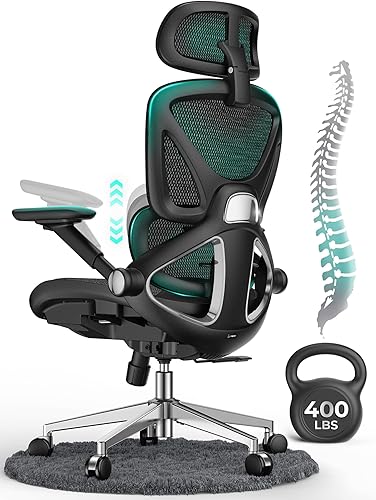
- 4D flip-up arms
- 400 lb stated capacity
- Three backrest lock angles
Flip-up arms can help clear desk space, and the stated 400 lb capacity distinguishes this pick from several others here.
Pros
- Arms flip up
- Height and depth adjustable headrest
- Three backrest lock angles
Cons
- Arm adjustment directions beyond flip-up are not specified
The CAPOT combines 4D flip-up arms with a stated 400 lb capacity. Flip-up arms can help when you want to move them clear of a desk or need more room beside the chair.
The chair's headrest adjusts in height and depth, and its backrest locks at 90°, 110° or 125°. Its seat is listed as 20 in wide and 19.3 in deep.
The arm details specify flip-up movement but don't fully describe the other directions covered by “4D.” If you need arms that move sideways or slide forward, verify those specific movements before you buy.
Pick the CAPOT if flip-up arms and its stated capacity are central to your decision. Its chair details also describe a larger seat, adjustable lumbar support and a headrest.
MOLENTS BIFMA Mesh Chair: Best for 3D arms with a mesh seat

- 3D adjustable armrests
- Full mesh seat
- Three recline positions from 90° to 120°
This chair pairs 3D armrests with a full mesh seat and an adjustable lumbar support.
Pros
- 3D armrests
- Full mesh seat
- Lumbar support adjusts up, down, forward and back
Cons
- Arm pad dimensions are not specified
The MOLENTS chair combines 3D adjustable arms with a full mesh seat. Its lumbar support moves up and down as well as forward and backward.
The backrest reclines from 90° to 120° with three positions. MOLENTS gives the seat width as 19.8 in and depth as 18.9 in, which can help you compare its fit with the other options.
The arm adjustment directions are not fully specified, so check those if you have a particular desk height or arm position in mind. Its full mesh seat may suit buyers who prefer mesh across both the seat and back.
Choose it when full mesh and adjustable lumbar support matter alongside 3D arms. Compare the seat dimensions with your current chair before making a decision.
Ergoa Mesh Chair with 4D Arms: Best for padded 4D armrests

- 4D soft-padded armrests
- Arms adjust up, down, in, out and forward
- Arms rotate 45°
Soft-padded 4D armrests adjust in several directions, with an additional 45° rotation for a more tailored position.
Pros
- Padded 4D armrests
- Removable adjustable headrest
- Adjustable backrest
Cons
- Seat dimensions are not provided
The Ergoa Mesh Chair stands out for soft-padded 4D armrests. They adjust up and down, inward and outward, forward and back, and rotate 45°.
That movement range is helpful if you want to adjust both arm height and how close the armrests sit to your body. The chair also has an adjustable backrest and lumbar support, along with a removable 3D headrest.
Its recline runs from 90° to 135° with three lockable positions. The available chair dimensions don't include seat width or depth, so check those details if you rely on a particular seat size.
Pick it if padded armrests and a clearly described set of movements matter most. The detachable headrest offers a choice between a high-back setup with the headrest and one without it.
GABRYLLY BIFMA Mesh Task Chair: Best for wide arm rotation

- 3D adjustable armrests
- Armrests rotate up to 215°
- Three-stage tilt
Its padded arms rotate across a wide stated range and adjust in height, depth and width.
Pros
- Padded 3D armrests
- Up to 215° arm rotation
- Three-stage tilt from 90° to 120°
Cons
- Seat width is not specified
The GABRYLLY chair offers 3D adjustable armrests with up to 215° of rotation. The arms adjust in height, forward and back, and width.
Its 3-stage tilt lets you recline from 90° to 120° and lock a preferred angle. GABRYLLY also describes a padded mesh seat with a waterfall edge and a 300 lb capacity.
The stated chair dimensions are 19.3 in wide, 20.5 in deep and 45.6 in high. Use those measurements to check the available floor space and compare the chair with your desk.
Choose this one if the wide arm rotation range is more useful to you than flip-up arms. Its armrests move in three dimensions, but buyers seeking a 4D setup may prefer another chair here.
Which arm adjustment should you choose?
A 3D armrest can be enough if you mainly want to adjust arm height, depth and angle. The SIHOO M57 and ELABEST describe 3D movement, while ELABEST spells out height, width and angle.
Choose 4D arms if you want more movement directions, but check what those directions are for the particular chair. The COLAMY and Ergoa offer 4D arms, and the Ergoa specifies height, width, depth and rotation.
Flip-up arms help when you want to move the armrests out of the way. The CAPOT and SIHOO B300 Pro have flip-up arms, with the B300 Pro also describing lift, rotation and sliding movement.
If the main issue is deciding whether arm support suits your desk habits, read should an office chair have arms?. For another arm design, compare the options in our office chairs with flip-up arms guide.
How do you fit chair arms to a desk?
Adjustable arms work best when their height and position suit your shoulders, desk and normal typing position. Sit with your shoulders relaxed and move the armrests until they support your arms without forcing them upward.
Check whether the armrests can move low enough to clear your desk edge. If they can't, you may need to raise the desk, lower the arms, or choose a chair with flip-up armrests.
Your desk height and keyboard position matter too. OSHA's computer workstation guidance covers workstation setup, including chair and work-surface adjustments.
What should you check before you buy?
Confirm the adjustment directions rather than relying on the 3D or 4D label alone. Look for clear details about height, width, depth, rotation and flip-up movement.
Compare seat width, depth and height with your body and desk. For example, the ELABEST seat is listed as 20 in wide, while the MOLENTS seat is listed as 19.8 in wide.
Check that the chair can fit under your desk with the arms in your preferred position. If the arms need to tuck out of the way, include that in your decision.
Which adjustable-arm office chair should you pick?
Choose the SIHOO B300 Pro if you want the widest stated range of arm movements, including flip-up arms. Pick the SIHOO M57 for 3D arms with headrest and lumbar adjustment, or the COLAMY if you also want a sliding seat.
The best fit depends on the movements you need and how the chair fits your desk. Compare the arm directions first, then check the seat measurements and other adjustments that matter for your workday.
Our top 3 picks at a glance
-
1
-
2
-
3
Frequently asked questions
What does 3D or 4D mean for office chair arms?
The number describes how many directions the armrests can adjust, but the exact movements vary by chair. These picks include armrests that move up and down, forward and back, or rotate.
Check the movements listed for a model and compare them with your desk and preferred arm position.
Are flip-up armrests useful?
Flip-up armrests can move out of the way when you need to slide a chair close to a desk or clear space beside it. They may also suit tasks where you prefer sitting without arm support.
Check that the arms stay in a useful position when lowered.
How should adjustable chair arms fit?
Set the armrests so your arms can rest comfortably while your shoulders stay relaxed. Their height and position should work with your desk, keyboard and normal sitting posture.
For broader workstation guidance, see the OSHA computer workstation eTool.
Do adjustable arms matter on an office chair?
They can help you position arm support around your body and desk setup. Fixed arms offer fewer ways to change that position.
If you're deciding whether you need arms at all, read our guide to whether an office chair should have arms.


